Understanding Network Devices

Imagine in today time living without internet, how our life looks. Its hard describe the situation, may be most of employees will be happy as there are no work to do. GenZ will feel irritating as they are not able to post pictures/stories on the Instagram. Overall, I can say Internet is one of the fascinating thing that human society build over the time.
In this blog, I will walk you through how internet reaches to your devices, along with that what are the other network devices which are helping them to make it possible. So that you can watch Netflix and chill.
- Network devices are the devices which makes possible that we are able to connect to the internet.
Network devices are hardware components like routers, switches, and modems that connect computers and other electronics, enabling data transfer, communication, and resource sharing across networks, acting as the essential "plumbing" for the internet and local networks by directing traffic, providing security, and managing connections. They facilitate seamless information flow, from basic connectivity to complex security functions, forming the backbone of modern digital communication.
If we observe the definition and its obvious as well, all network devices are hardware.
To put the definition simply, Network Devices are the tools which share, connect and control the flow of internet/data between devices are network devices
Now lets see the Common Network Devices and their functions.
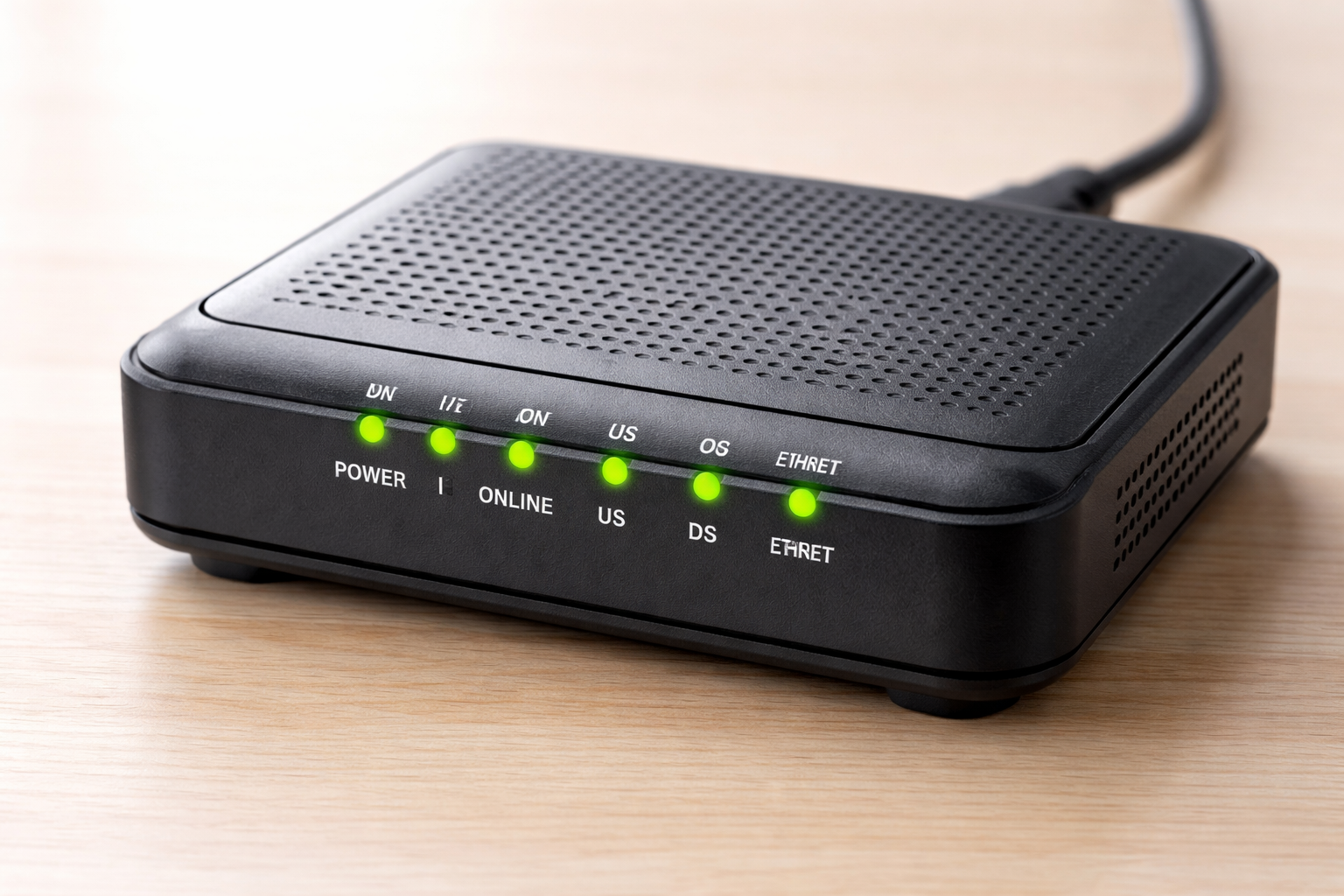
Modem is the device which receives the data from ISP ( Internet Service Providers like AIRTEL and JIO ) and share with your router/device. If you are thinking why not ISP directly giving to the router, the answer is the data comes from ISP is in different format, so modem converts that data in the format which router understands. Below I am attaching the image of Modem.
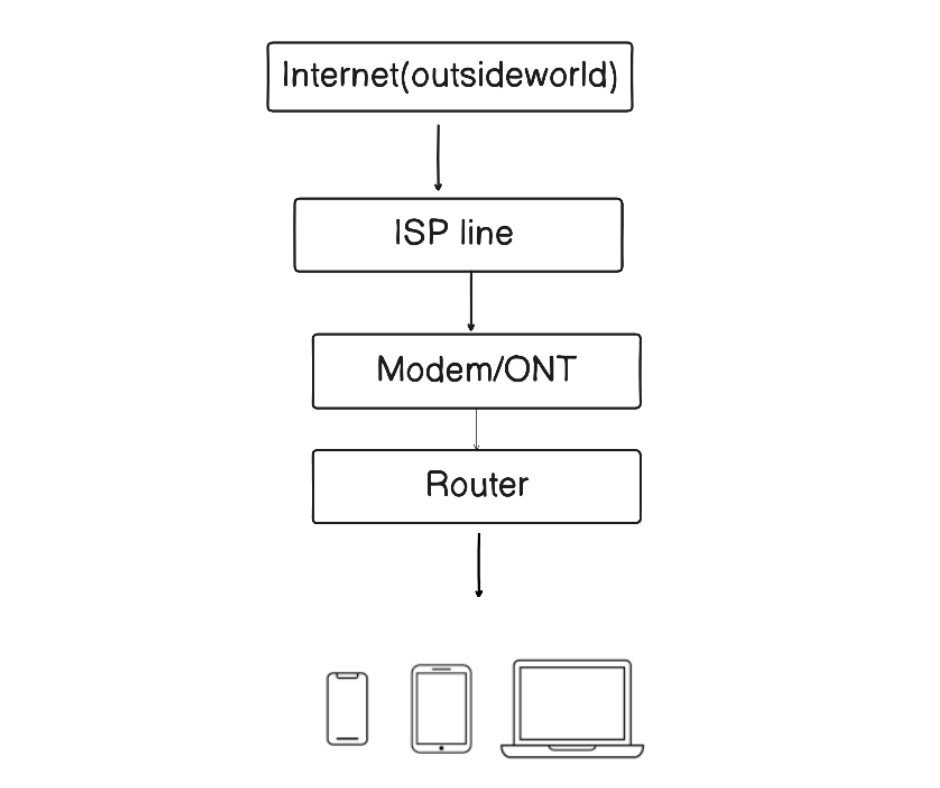
Now lets talk about Router, Router is the first device which receives the data/internet in your home/office network. You can consider him as main manager of internet in your network. Router has two main jobs.
First one, See the ISP gives you one internet line, its router job to make it connected with multiple devices like your phone, laptop and the TV)
Second one, To understand this, lets say your router is connected with multiple devices. every device is requesting the certain data. Now its router job to send the response/data to particular device which requested the data. In short , I can conclude that Router keeps track who asked the data so that he can send the data to respective device.
To understand this better you can see the diagram below
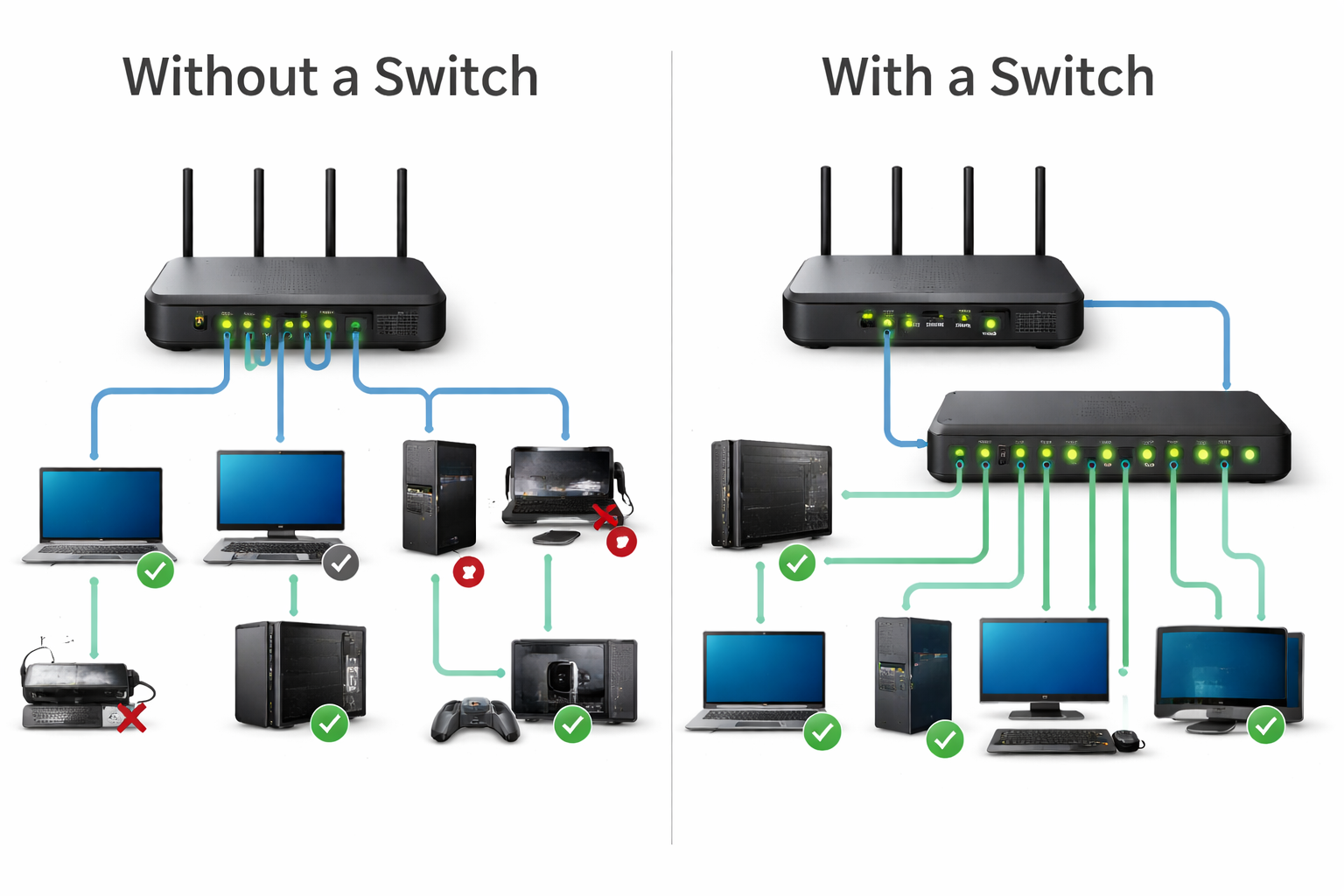
Switch is the compliment device to the router, Switch helps you to connect your multiple devices ( like printers, computers ) with LAN ( Local Area Network ).
In case you are thinking why Switch then here is the answer. See you need switch when you want to connect more wired device in your home/office that your router can handle.
The Key point here is switch doesn’t replace or broke the router/modem/ISP flow. It works inside your local network, after the router.
Router has limitedl LAN ports. Most routers have 2 to 4 LAN ports( as you can see in the below image). Lets say you need to connect with 8 office PCs, printers, CCTV, TV and gaming consoles. So in this case you will run out of ports. Now to solve this concern we add a switch to “multiply ports” .
Switch vs Hub
Now lets see the difference between SWITCH and HUB
A hub does the same basic job as a switch, to connect multiple devices in a local wired network. But the way it handles data is so inefficient that switch replaced hubs almost everywhere.
A hub is like a multi plug for network cables, but it has some issues. like if one device sends data into the hub, the hub copies that data to every port so all devices receive it. then you might thinking then what is the problem, this happens even if only one device is the real target.
As a analogy, Hub is like announcing on a loudspeaker in a room, everyone hears the message.
Now why switches are preferred, Because switch is “Smart”.
Here is how, It learns which device is connected to which port, it sends the data only to the intended device/port. As a result your network is faster, cleaner and more private.
As a analogy, Switch delivers a message to the correct house (only right person gets it).
You can see the clear comparison in the table. ( this table is generated with the help of GPT just wanted to let you know : )
Hub vs Switch (Comparison)
| Feature | Hub | Switch |
| Primary purpose | Connect multiple devices | Connect multiple devices |
| How it sends data | Sends to all ports (broadcasts) | Sends to only the right port |
| Speed/Performance | Slower as devices increase | Much faster and efficient |
| Collisions/Traffic chaos | High (more “traffic jams”) | Low (better traffic handling) |
| Privacy | Poor (others can see traffic) | Better (traffic stays mostly private) |
| Best use today | Almost none (legacy) | Standard everywhere |
| Cost | Very cheap (but outdated) | Slightly higher, worth it |
- To Summarize all this, Hub connects devices but floods everyone with every message where as a switch connects devices and delivers messages only where they belong so switches are faster and cleaner.
Firewall
Read the definition first
A firewall is a network security system, either hardware or software, that monitors and controls incoming/outgoing traffic based on rules, creating a barrier between trusted internal networks (like your home/office) and untrusted external ones (like the internet) to block unauthorized access and threats. It acts like a digital security guard, inspecting data packets to decide whether to allow, reject, or drop them, protecting against malicious traffic and enforcing security policies.
Firstly Why we need firewall, see when you connect to the internet, you are not only going out to websites, the internet can also try to come in. Even if you are didn’t notice it, you network is constantly getting unwanted connections attempts, random scans from bots looking for weak devices and sometimes malicious traffic which is not healthy for your device. So in order to protect your local network firewall acts like the gate that decides what is allowed in/out and what should be blocked.
See the image below it will help you to understand the concept visually.

Why Security lives here: Simply Because the firewall sits at the best control point the border. Mostly traffic passes through it, so one place can protect many devices. And Imagine this if you block 90% of unnecessary traffic at the gate, attackers have very few chances to harm your network. Also, firewalls continuously (24/7) keeps eye on the network traffic it checks who tried to connect, what was blocked and patterns of attacks as well.
To Summaries this, A firewall is the gatekeeper of your network: it lets the internet serve you, without letting the internet access you.
Load Balancer
Imagine a situation where YouTube has multiple servers, it does make sense because as YouTube have plenty of request to handle, to do this effectively company prefer to have multiple servers, Now as you have multiple severs you need someone who can manage them, that’s where load balancer came into the picture.
Lets first see the definition first. Also do checkout the image below, you will understand this better.
A load balancer is a hardware or software component that distributes incoming network traffic across multiple servers (a server pool) to ensure high availability, reliability, and performance. Acting as a "traffic cop" in front of servers, it prevents any single server from becoming overwhelmed, improves user experience by reducing latency, and allows for seamless scaling.
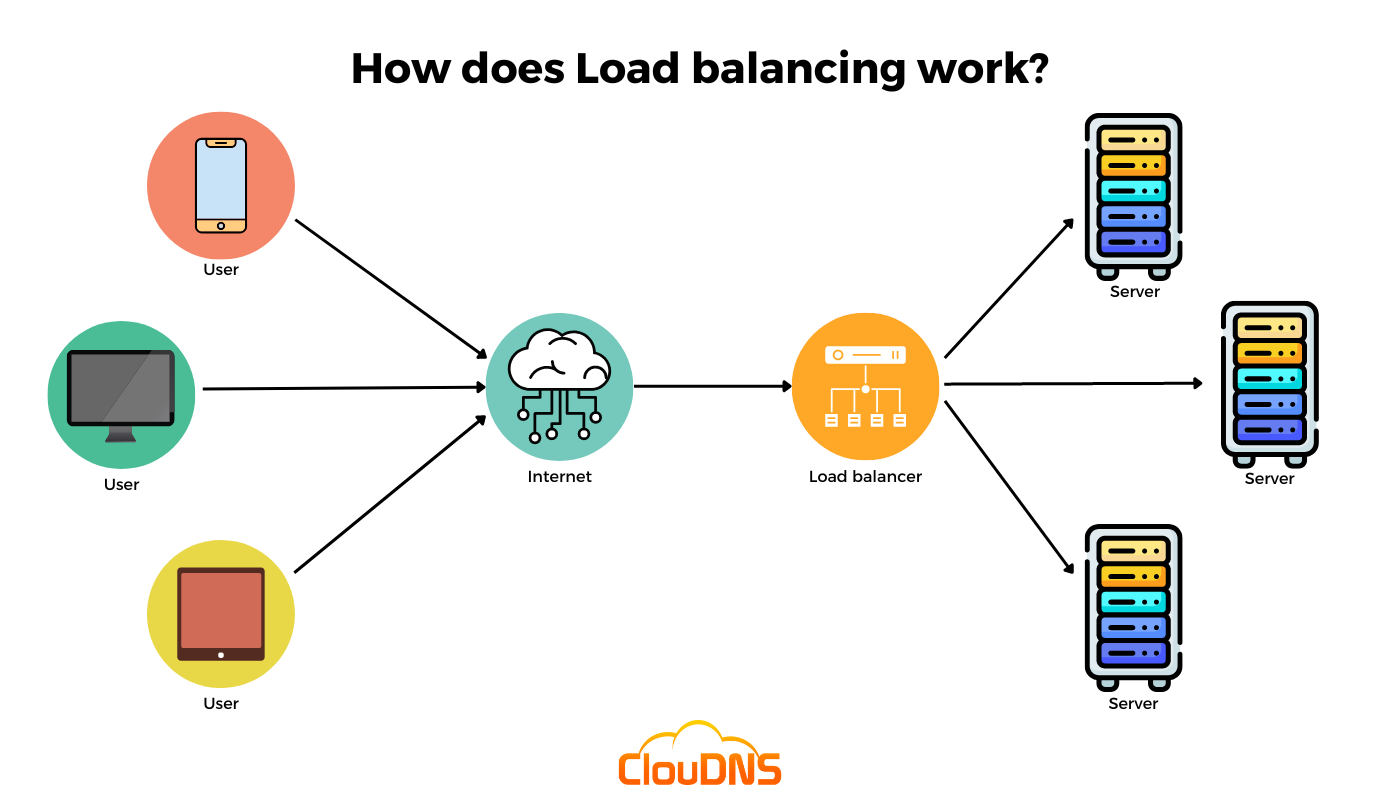
In a very simple words, When thousands of users try to open the same website, one server can get overloaded. So companies run multiple servers that can do the same job, and the load balancer sits in front and decides which sever should handle each request as “traffic cop” as mentioned in the definition.
Functionally, Load balancer distributes traffic which means it sends requests across servers A, B, C.. so no one server get overloaded. Also if any server lets say B fails, then it automatically send traffic to A and C.
It also helps you scale as when traffic grows, you add more servers, the best part is user still use the same URL. Also, You can updates server one by one without downtime.


